2024 Digital Vision Board Planner
Imagine starting 2024 with clarity—not just a list of goals, but a living, editable visual system that adapts as you grow. The 2024 Digital Vision Board Planner is more than a trendy download: it’s a thoughtfully structured digital toolkit designed for real-life use by professionals, creators, educators, freelancers, and anyone who values intention over inertia. Built for Canva, it gives you full control—no design skills required—and delivers high-resolution PDF, JPEG, and PNG files ready for printing or screen use.
Why This Isn’t Just Another Printable Planner
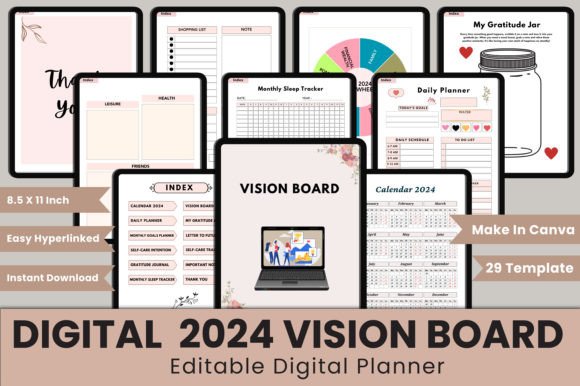
Many people assume all digital planners are interchangeable—especially when they see “vision board” and “2024” in the title. But not every planner supports actual progress. Some lack structure beneath the aesthetics; others overload pages with decorative elements while sacrificing usability. The 2024 Digital Vision Board Planner avoids those pitfalls by integrating purpose-driven sections: a hyperlinked index for quick navigation, a full-year calendar synced to monthly planners (January–December), daily action prompts, goal-setting frameworks, self-care intention trackers, gratitude journaling space, sleep logs, and even a “Letter to Future Me” page—all sized at 8.5×11 inches, 300 DPI, no bleed, print-ready.
Common Missteps—and How to Avoid Them
Mistake #1: Assuming “editable in Canva” means zero setup.
Some users expect drag-and-drop simplicity only to find templates locked behind premium Canva elements—or worse, discover their free account can’t access key fonts or icons. This planner includes an editable Canva link with all assets pre-loaded using Canva’s free tier library. No upgrades needed. Before downloading any digital planner, always verify whether fonts, icons, and layout layers remain editable without subscription barriers.
Mistake #2: Overlooking file versatility.
You might plan to journal on your tablet but later want to print your vision board for your desk—or share a clean JPEG version with a coach. Relying solely on one format limits flexibility. With this planner, you get PDF, JPG, and PNG files—each optimized for its use case. PDFs preserve hyperlinks and typography; JPGs load fast for social sharing or digital displays; PNGs offer transparent backgrounds if you’re layering into presentations or mood boards.
Mistake #3: Ignoring layout consistency across devices.
A beautiful planner falls apart if your monthly goals page looks cramped on iPad, or your gratitude journal disappears when exported to PDF. This planner uses a standardized 8.5×11 inch canvas—tested across desktop, tablet, and mobile Canva apps—with clear margins and responsive spacing. That means what you edit on your laptop appears legible and balanced on your phone’s Canva app too.
What to Check Before You Commit
Before adding any digital planner to your workflow, ask yourself three practical questions:
- Is the structure aligned with how I actually plan? Do you think weekly? Daily? In themes like energy, growth, or balance? This planner offers both monthly and daily views—plus intention-based trackers (self-care, sleep, gratitude)—so it supports multiple planning rhythms, not just rigid scheduling.
- Can I personalize it without breaking functionality? Hyperlinks, checkboxes, and layered text boxes should stay functional after editing. This planner uses Canva’s native linking tools and non-destructive grouping—so changing colors or swapping images won’t disable your calendar navigation or erase your “Gratitude Jar” entries.
- Does it scale beyond January? Many 2024 planners fade in usefulness by March. But with 29 distinct template pages—including “Important Notes,” “My Gratitude Jar,” and “Self-Care Tracker”—this system grows with you. It’s built for iteration, not just initiation.
Real-World Use Cases That Work
A freelance graphic designer used the Monthly Goals Planner to break down client deliverables into visual milestones—and pinned her completed vision board to her studio wall. An educator adapted the Daily Planner to track classroom reflection prompts and student engagement notes, then exported clean PDFs for her professional portfolio. A small business owner combined the Sleep Tracker and Self-Care Intention pages to identify burnout patterns—and adjusted her client intake schedule accordingly.
None of these outcomes relied on perfect execution. They worked because the planner met real needs—not just aesthetic ones.
Quality Isn’t Just About Pixels
Yes, this is a high-quality digital product: 300 DPI, crisp text, consistent spacing, and smart file organization. But quality also lives in how easily you can trust the tool. When your “Letter to Future Me” saves correctly—and your “Vision Board” page lets you drag, resize, and replace images without glitches—you’re not just using software. You’re building confidence in your own planning process.
That’s why the 2024 Digital Vision Board Planner includes thoughtful extras: a “Thank You” file (for sharing appreciation with your team or clients), a “My Gratitude Jar” page designed for quick emotional resets, and a hyperlinked index that works whether you’re scrolling on a tablet or flipping through printed pages.
Final Thought: Your Time Is the Real Investment
You don’t need more motivation. You need better scaffolding. The right digital planner doesn’t add pressure—it removes friction between intention and action. If you’ve tried paper planners that got abandoned by February, or Canva templates that felt disjointed or hard to customize, this is your reset point. It’s not about perfection. It’s about having a reliable, adaptable, human-centered system—one that meets you where you are in 2024, and supports where you’re going.
Thank you for visiting my product. If you like this product, don’t forget to visit my store for more intentional, well-structured digital tools designed for real work and real life.